Downtime Solution
A cloud-native downtime solution providing a critical backup solution for when key hospital systems become unavailable due to either planned/un-planned downtime.

Introduction to the Downtime Solution
The Downtime Solution is a modern, cloud-native platform that supports clinical services during planned downtime of the main hospital EPR system. During unplanned downtime, the system provides critical information to hospital staff across multiple facilities, ensuring the continuity of patient care.
Using the documented API, hospital integration teams provide feeds for admissions, discharges and transfers. You decide what information should be published to the downtime app and configure the retention policies to enforce. When a patient’s discharge date is updated, the system purges the storage used for that patient, reducing your storage requirements and keeping you compliant.
You only pay for the storage you use, and we offer a free 3-month trial to determine your storage requirements before committing to a 12-month storage strategy. You can utilise this 3-month trail to dual run with your existing downtime solution to ensure DowntimeApp meets your requirements.
As we use serverless technology, the compute required to run the application is free, and will automatically scale to meet your requirements.
System Architecture
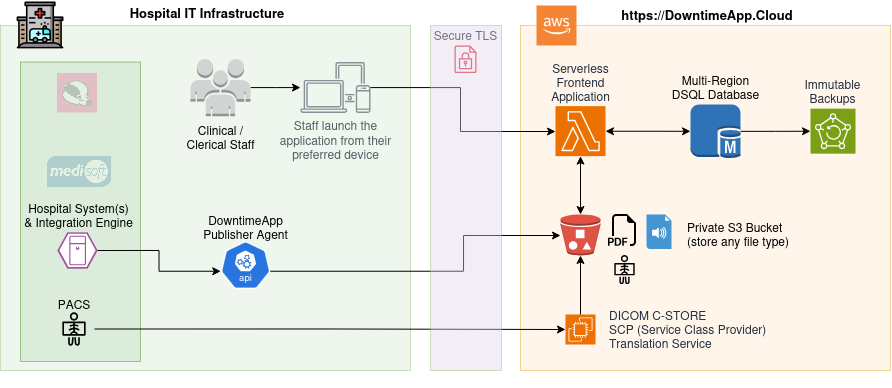
We provide several copies of the environment outlined below to match your EPR environments. For example, we support Prod, Cert, Mock and Build.
Features
Cloud Native
The DowntimeApp utilises Amazon S3 with Intelligent Tiering to minimise storage costs while ensuring durability and scalability.
The metadata we use to track which patients are in which wards runs on the fastest serverless distributed SQL database — Amazon Aurora DSQL — with point-in-time recovery enabled via AWS Backup.
Windows Identity
Our desktop launcher wraps the user’s Windows Identity into a signed token before launching the application, allowing admins to control access and IG teams to report who accessed which patient records during a downtime.
Bring Your Own Device - BYOD
In rare instances when both the main EPR and the hospital’s internet access are down, staff can access the downtime app on their own device using their own data plan.
Each staff member must have pre-registered with the service, while the desktop launcher is accessible via the internet. Staff can obtain an OTP passcode via a QR code and an authentication app like Google Authenticator.
When accessing the platform on their mobile devices, they will need to enter their Windows username and the one-time passcode from their chosen authentication app.
Milestones
- Development has started, follow the code repository to keep updated, or follow the change log
Technology Stack
Written using the open source programming language Go (1.26) & hosted on AWS